What to have ready before commissioning your website
· 5 min read ·
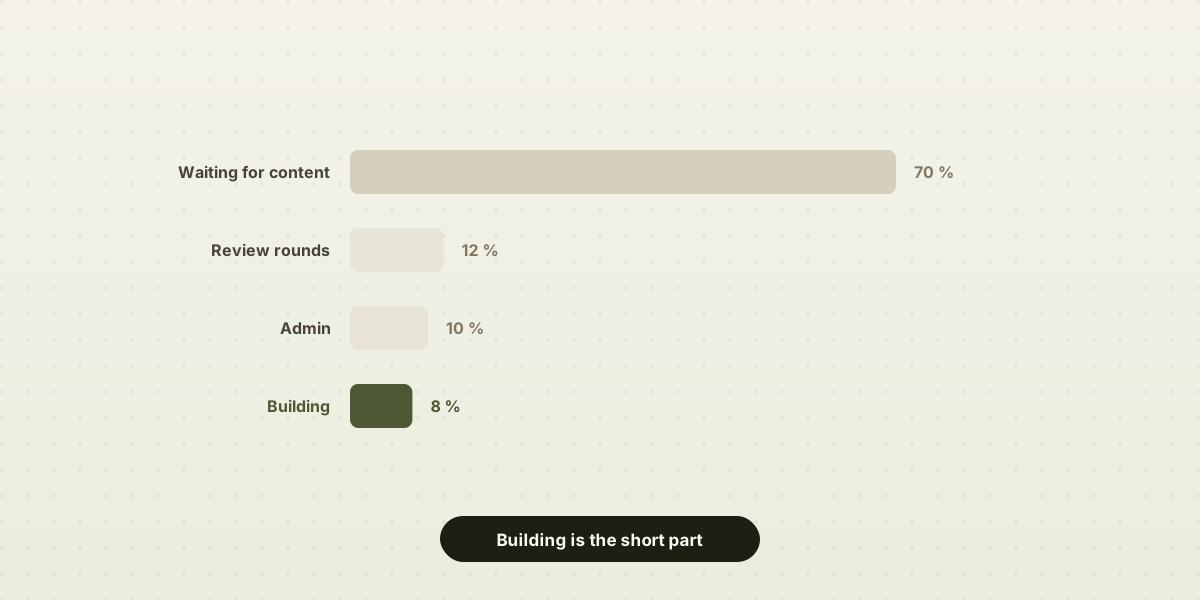
Websites rarely stall for technical reasons. What actually happens is more mundane: the structure works, the design is settled, and everything sits still for a fortnight waiting on a service description or a decent photo of the premises.
Here is what to gather before sitting down to build it, and exactly what happens when each piece is missing. It holds either way, whether you are going to build the site yourself or hand it to somebody else: what is missing is missing in both cases.
The text, which carries the most weight
It does not need to be polished or even properly written. What it needs is raw material:
- One sentence explaining what the business does, with no jargon and no adjectives. If a neighbour would not understand it, it is not ready.
- A paragraph per service: what it is, who it is for, what it includes and what it does not.
- Real details for the about page: how long the business has been running, where, with what kind of client, what qualification or licence sits behind it.
- Two or three client testimonials with a full name attached, if there are any. They are worth more than any slogan.
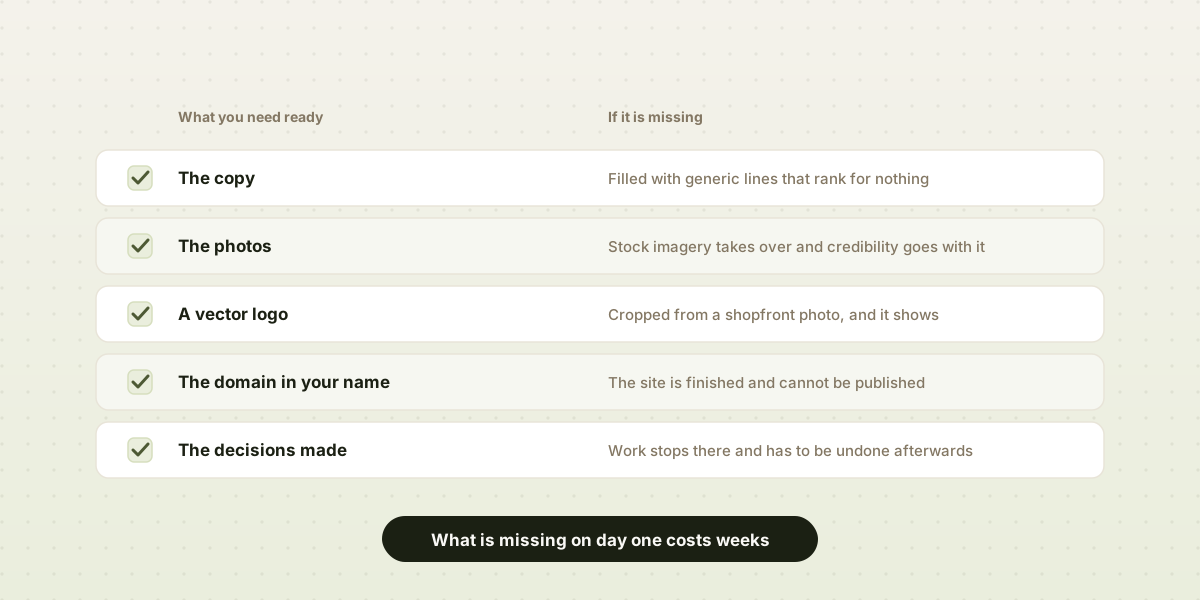
What happens when it is missing. The gap gets filled with generic filler along the lines of "quality and commitment since day one", which sets the business apart from nobody and ranks for nothing in search. The alternative is to leave the site half-built until it arrives, which is how most of them end up. Copywriting can be commissioned separately, and it sits in the add-ons, but even that does not remove the underlying work: nobody can write from the outside what a business does and how it differs.
The photos
Own photos work: the premises, the team, the product, finished work. Landscape, natural light, at least 2,000 pixels wide. Ten good ones do more than a hundred mediocre ones.
What does not work: WhatsApp screenshots, images carrying a supplier's watermark, or anything pulled from a Google search. That last one is not a matter of taste: claims over the use of licensed images are common and expensive.
What happens when it is missing. The fallback is stock imagery, which sits in the add-ons. It looks fine and it works, but it costs the website exactly what made it credible. A hair salon showing its own premises persuades more than one showing a model smiling in a studio in Ohio.
The other way out is to leave the slot labelled and publish anyway, carrying a description of what belongs there. It matters less than it sounds: the photo replaces it the day it exists, and meanwhile the site is already working.
The logo and the colours
Vector format is ideal: SVG, AI or EPS. If all that exists is a PNG, it should have a transparent background and be around 1,000 pixels wide at minimum. If there are brand colour codes, they are worth writing down.
What happens when it is missing. The logo ends up cropped out of a photograph of the shop sign, and it shows. A pixelated logo in the header is the first sign of a cheap website, however well everything else is resolved.
Having no logo at all blocks nothing: plenty of businesses work perfectly well with their name set in good type. What does not work is a poor logo scaled up large.
The domain and the email
Two things are worth checking before anything starts: who is listed as the domain's registrant, and who has access to the control panel where it is managed. If a previous agency registered it, or an acquaintance nobody can reach, recovering it can take weeks of paperwork.
What happens when it is missing. The website is finished and still cannot carry the address your customers know you by. It is the most frustrating delay of all, because by then it no longer depends on anyone touching the site: these are transfers between registrars, and they take what they take. Which is why it is worth looking at on day one rather than on the last one.
If the business still runs on a Gmail or Hotmail address, this is also the moment to decide on moving to email at your own domain. It is bought from an email provider, separately from the website, and doing it at the same time saves a migration later.
The decisions nobody else can make
Three of them, and they are best settled in advance:
- What a visitor should do. Call, write, book a slot, buy. One primary action. A website that asks for five different things achieves none of them.
- Whether prices are published. That is a commercial decision, not a design one, and it changes the structure of the pages entirely.
- Which pages are genuinely needed. Usually two of the ones imagined at the start turn out to be unnecessary.
What happens when it is missing. The result is a competent digital brochure where nobody knows what is expected of them. It shows in the traffic: people arrive, read and leave.
The legal details
Registered trading name, tax number, address, contact email and, where applicable, company registry details. Without them the legal notice and the privacy policy cannot be published, and both are required from day one.
Checklist
- One sentence explaining the business, jargon-free
- A paragraph for each service
- True details for the about page
- Two or three client testimonials, with permission to publish them
- Ten to twenty own photos, landscape and at decent resolution
- The logo in vector format, or a large PNG with a transparent background
- Confirmed access to the domain, or a decision to register one
- The primary action a visitor should take
- Prices: published or not
- Complete company details for the legal pages
Pulling all of this together is usually an afternoon of tracking down what already exists, scattered across folders and phones. What gets expensive is discovering it is missing with the site half-built, because that is where the momentum stops.
With the folder ready, the rest is the quick part: the site is built here, you watch it finished as each piece of text drops into place, and publishing it costs nothing.