Web accessibility: who the European rules actually apply to
· 6 min read ·
The European Accessibility Act applies in Spain from 28 June 2025. Since that date, a large share of the businesses that sell or provide services online have to make their website accessible. This is not a piece of good practice or a badge that looks well on a footer: it is an obligation.
The usual reaction is to assume it is aimed at large companies. Often it is, but it is worth checking, because the exemption almost everyone has in mind is narrower than it looks.
What the rules ask for
That a person with a disability, whether visual, hearing, motor or cognitive, can use the website without depending on anyone else: read it, understand it, fill in a form and complete a purchase.
The reference standard is WCAG 2.1 at level AA. It is a set of specific, testable criteria rather than a statement of intent: every point is checked and answered with a yes or a no. One example from level AA itself: normal text needs a contrast ratio of 4.5 to 1 against its background, and large text 3 to 1. That is measured, not debated.
The obligation covers above all the services that are contracted online: e-commerce, bookings, appointment scheduling, banking, passenger transport and digital content. If people buy, book or sign up from your website, the sensible starting point is to assume you are in scope, and then check whether the exemption takes you out of it.
The microenterprise exemption requires two conditions at once
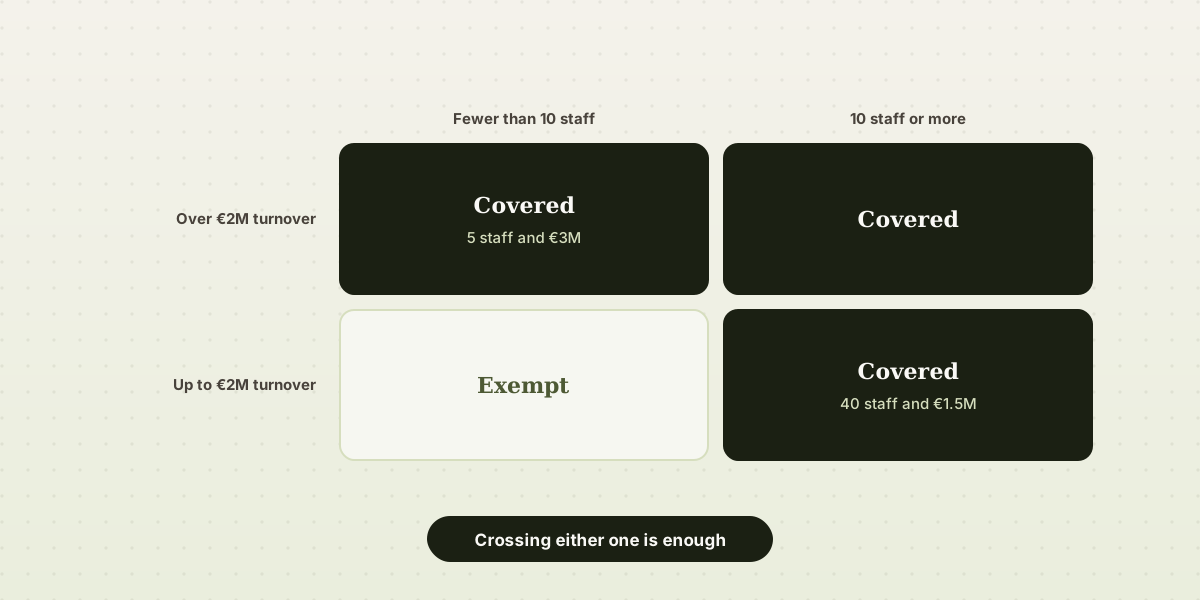
There is an exemption for microenterprises providing services. To rely on it, a business has to meet both conditions at the same time:
- fewer than 10 employees, and
- up to €2 million in annual turnover.
The conjunction is an and, not an or. So exceeding just one of the two is enough to be covered by the obligation. Put as two examples that tend to surprise people:
- A company with 40 employees and a turnover of €1.5 million is obliged to comply. It stays within the turnover limit, but not the headcount one.
- A company with 5 employees and a turnover of €3 million is obliged too. It stays within the headcount limit, but not the turnover one.
Only a business below both thresholds falls outside. And the thresholds read as follows: the obligation appears from 10 employees and from €2 million, not above those figures.
How to check it rather than assume it
Most small businesses do meet the exemption, but it is worth treating as something you verify rather than something you take for granted. Two figures are needed, and your accountant has both:
- The average headcount over the year, not today's. A business with seasonal cover can be hovering around ten without realising.
- Turnover for the last closed financial year, meaning sales, not profit. Mixing the two up is a common mistake and it changes the answer completely.
With those two numbers the check takes a minute: if either one reaches its threshold, the exemption does not apply.
Two more warnings. Nobody grants the exemption and no certificate proves it: it is a matter of fact that has to stand up if somebody asks. And it is not permanent. A growing business stops being exempt in the year it crosses either line, and no notice arrives to say so.
What almost always fails
Even if the exemption does cover you, most of this is a single afternoon's work and it improves the site for everyone, not only for people with a disability. These are the problems that come up again and again when reviewing a website that is already live:
- Insufficient contrast. Light grey on white, text over a photograph, a brand button whose colour lands on 4.4 when the minimum is 4.5. Any contrast checker measures it, and a slightly darker shade fixes it.
- Images with no alternative text. A screen reader reads whatever is in the
altattribute. If it is missing, the image does not exist; if it says "image1.jpg", it is noise. Decorative images should indeed carry an emptyaltdeliberately, which is not the same as forgetting it. - Forms with no labels. The grey text inside the field is not a label: it disappears as soon as you type, and many screen readers never announce it. Every field needs its own visible
label, properly associated. - Videos with no captions. This affects people who cannot hear and equally the many more who watch on the train without headphones. Automatic captions, tidied up by hand, deal with it.
- Navigation that is impossible with a keyboard. The test is quick: go through the whole site with the tab key and no mouse. If the focus gets lost, if a menu will not open, or if there is no visible sign of which element is selected, there is a problem there.
Four of those five should not be down to you
That list is also the answer to what a website built at Díaz Oliva brings resolved out of the box, and it is worth saying with specifics, because "accessible" on its own means nothing.
- The contrast is measured, not eyeballed. The palettes are not written by hand: each colour is derived by darkening it until it passes, and then every combination of text over background is checked one by one against the 4.5 minimum (or 3 for large text). There is no way to pick a combination that fails, because the ones that fail never come into existence.
- Every image asks for its description in the editor, in the field next to the image itself. Alternative text stops being something you forget and becomes something you answer while placing the photo.
- Where there is a form, every field carries its own visible label, properly associated, rather than grey text inside the field that vanishes as you type.
- Keyboard navigation comes as standard, with a skip-to-content link and the focus always visible.
What stays on your side is what no tool can resolve: that the alternative text you write genuinely describes what the photo shows, and captions for a video if you add one. And on a website that already exists, bringing it fully into line is quoted separately, because there what has to be reviewed is somebody else's work.
Commissioning the website does not transfer the responsibility
This point is missed often. In front of the authorities and in front of your customers, the party responsible for compliance is whoever provides the service, which means your business. Whether the site was built by an agency, an acquaintance or a template platform does not change who answers for it.
Hence a practical consequence: you have to be able to say what it was checked with. If a third party builds the site, get it in writing that it is delivered in line with WCAG 2.1 level AA, how that is verified, and what happens if it is not met. If you build it yourself on a tool, the question is the same one put to the tool: what does it resolve and what is left to you. Either way, an answer that names neither the standard nor what it was measured with is not an answer.
And if you already have a website built by somebody else, the question to put to them is a direct one: does it meet WCAG 2.1 AA, and what was it verified with?
Where to start
Start with the two figures behind the exemption. If it covers you, go through the list above anyway: these are cheap faults to fix and expensive ones to carry around. If it does not cover you, the reasonable path is an audit of the current site, a plan of corrections ordered by severity, and the requirement written into everything contracted from now on.
None of this is legal advice. If the case is a borderline one, a headcount hovering around ten, a turnover approaching the threshold, or a sector with rules of its own, a conversation with whoever handles the legal side of the business costs considerably less than rebuilding a website.
And if the point is for the new site to be born compliant, it is built here, with the contrast measured and the labels in place before you write the first word. Seeing it finished costs nothing; you only pay when you publish.